
A 4x4 choreography sheet is a visual plan for a Grok Imagine dance video: sixteen poses arranged in one image. The important choice is how you supply that image. A reference can describe the movement you want; a first-frame input also establishes what appears at the beginning. Neither choice turns sixteen panels into sixteen guaranteed timed keyframes.
On October 23, 2026, LumiStage shared two community examples: one used choreography, character and background references for a reported 720p, 15-second clip; the other used a pose sheet as the first frame for a reported 1080p, 10-second clip. The creator credited @muku_sns for the idea, reported some pose reinterpretation and trimmed 0.25 seconds from the second opening. Different characters, inputs and durations prevent a controlled comparison.
We reviewed the attached clips and current official documentation. We have not reproduced the workflow in a signed-in Grok account. The exercise below is an original planning suggestion, rather than a tested recipe or a promise of exact choreography.
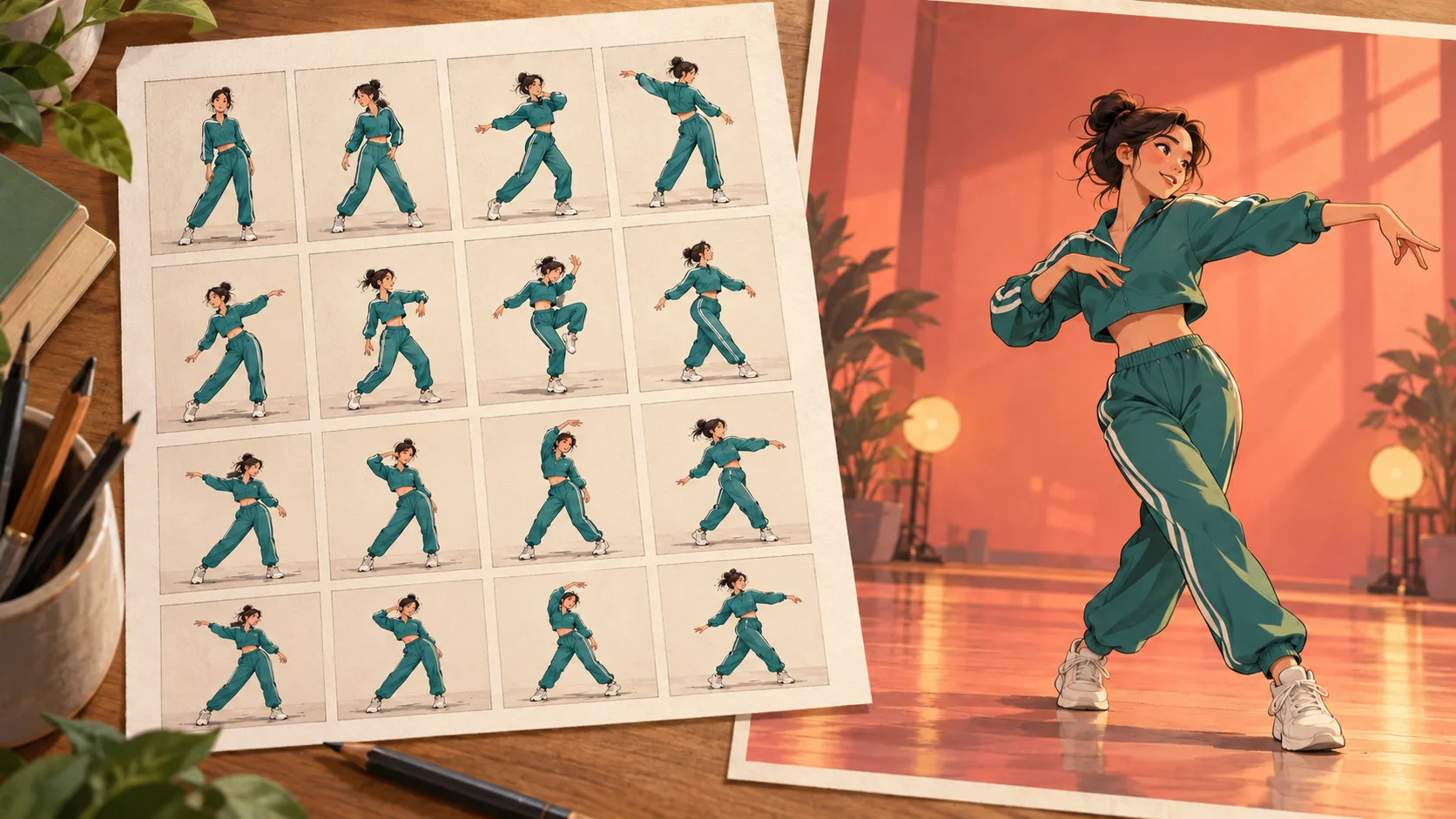
Separate pose, identity and scene
A pose sheet explains where the body should go. A character reference explains who is moving. A background reference explains where the action happens. Keeping those decisions separate makes a failed result easier to diagnose.
For example, an original adult dancer might wear a teal tracksuit and white shoes in a plain rehearsal room. The choreography sheet can focus on arm positions and foot placement, while a separate accepted character image preserves the costume and silhouette. Avoid asking a tiny panel to communicate every facial detail, lighting decision and movement at once.
A turnaround sheet serves another purpose: it shows the same design from different angles. If your character is still changing between views, first prepare a reviewed character design. Then create the motion plan from that accepted design.
Choose reference guidance or an opening image
The official reference-to-video documentation distinguishes appearance guidance from a pinned opening. The image-to-video documentation describes animating the supplied still. These API concepts help explain the choice; consumer interfaces may expose different controls.
| Input choice | Planning implication | What to inspect |
|---|---|---|
| Pose sheet as a reference | Ask for one performer using the sheet as movement guidance. | Does the result interpret the poses or reproduce the grid? |
| Pose sheet as the first frame | The starting composition contains the sheet itself. | Does the opening need trimming or transition into a single scene? |
| One accepted pose as the first frame | Begin with a clean, full-size performer. | Does the requested motion remain understandable without all sixteen panels? |
The community examples do not establish that a particular resolution causes better motion. Choose the input role first; then check the options in your own interface. This article does not announce a dedicated choreography control on Gvid.
Plan a short phrase before drawing sixteen panels
For a first exercise, use a simple action phrase you can describe without an image: step left, return, step right, return, raise the arms, lower them and settle. Write down the intended order before producing a sheet. That written plan becomes your review reference.
Use each row for a small part of the phrase. For example, the first row can show the left step and return, the second the right step and return, the third an arm gesture and the fourth the recovery. Keep the camera angle and character scale consistent. Leave room around hands and feet so their positions remain readable.
Check the sheet itself before generating video. Count its rows and columns, inspect the hands and shoes, and confirm that one character appears throughout. If the drawings contradict each other, correct them before evaluating the animation. A beautifully drawn grid is still a poor plan when adjacent poses require an unexplained jump across the room.
Give each input an explicit job
Here is an original natural-language brief for an interface that supports separate references. Replace the descriptions with the actual reference labels that interface provides:
Create one continuous full-body dance shot with one adult performer. Use the character reference for identity and clothing, the room reference for the setting, and the four-by-four pose sheet only as choreography guidance. Read the sheet left to right, then top to bottom. Begin in a single rehearsal-room scene. The performer steps left and returns, steps right and returns, raises both arms, lowers them and settles. Keep the camera fixed and preserve space around the hands and feet. Do not show a contact sheet, multiple panels or multiple performers.The reading order and exclusions express your intention; they do not establish model enforcement. For a first-frame experiment, a clean single-pose image offers a different opening than the complete grid. Save the exact input, prompt, duration and output settings so you can explain what changed between attempts.
Review the sequence before polishing the edit
Watch the clip once for movement order and again for identity. Record where an action is omitted, reversed or replaced. Then inspect whether the face, costume, body proportions and scene remain recognizable. Judge these separately: pleasing animation can still miss the planned gesture.
Inspect the beginning before trimming. Preserve the original file and note the removed duration in an edited copy. An opening grid that disappears after a cut is an editorial result, not evidence that the generation began with a clean stage. If timing to music matters, compare the visible movement with the intended beats in your editor rather than assuming equal panel spacing creates equal time intervals.
For a useful comparison, keep the same character, sheet, scene, duration and camera instruction while changing one input role. The published pair is inspiration for that experiment, not a substitute for it.
Use timed anchors for a different problem
A contact sheet is one image containing many poses. It is different from the individually timed images described in the Grok Imagine keyframe guide. Investigate those controls when a particular pose must occur at a particular moment, and check their current limits before assembling a request.
Your next step can be small: one accepted character, one readable movement phrase and one clip reviewed against that phrase. Expand the choreography after you understand which movements survive and which need revision. For broader motion wording, continue with the image and video prompt guide.